Raspbmc’s jam-packed June jollifications!

This one’s a big update and brings a lot of features to Raspbmc. Here’s what’s new this month:

  • Tweaks to the initialisation system speed up booting and remove some initial UI lag that occurs just after startup
  • There are some performance and stability enhancements, particularly when playing high bitrate content.
  • Updated firmware and kernel
  • Fix for TP-Link WN725N V2 devices
  • Fix Live TV stopping when selecting another channel
  • Fix for Live TV aspect ratio issues resulting in black screen
  • Backport of delegation of discontinuity in streams to GPU rather than OMXPlayer (resolves some streaming issues), thanks to popcornmix for the original fix!
  • Now available via Raspbmc Settings:
    • Boblight support provides an ambilight like implementation. Take a look at this user’s setup here
    • Raspberry Pi camera addon support allowing surveillance. This is useful for watching a bird feed or your kids. Images are taken at a desired interval and uploaded to /home/pi/camera.
    • Ability to scan for WiFi hotspots instead of having to type the SSID in.
  • Users now warned if power supply is detected to be inadequate
  • Simultaneous audio output (HDMI and Analog) is now supported
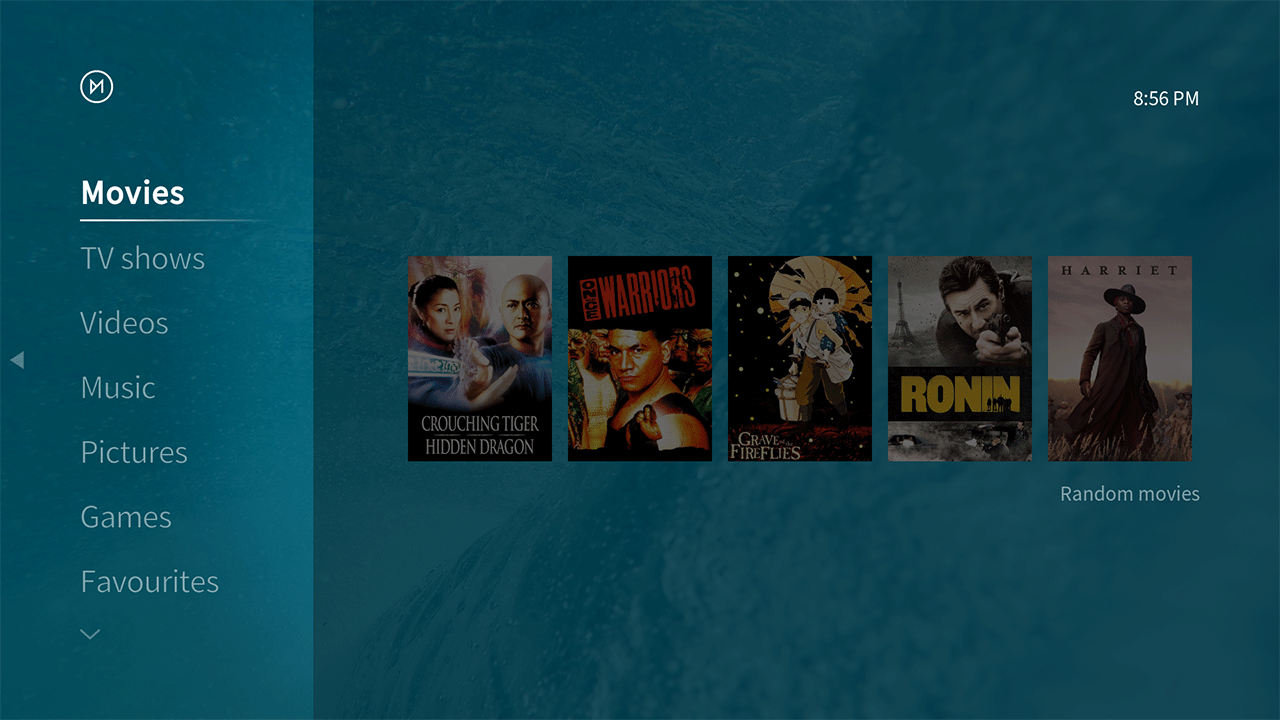
  • A new XBMC skin, made for Raspbmc by A Future Pilot and fuzzword. Many thanks to the wonderful contribution that these two have made. You can swap back to the default skin at any time via System -> Settings.
  • libCEC is updated for improved compatibility with TV sets.
  • 24 hour nightly builds of XBMC 13.x are now available again
  • Enable IPV6 connectivity for SSH
  • /tmp and /var/log no longer stored in ZRAM tmpfs
  • Support for NOOBS 1.2
  • Support for Stealth Nighthawk F117A
  • Another two mirrors have joined the Content Delivery Network which means faster updates and installs. The project is very weak for downloads in Asia and would very much appreciate a mirror to help offer users a good quality update and installation experience there.

To get the update, simply reboot your Raspberry Pi. Note that if you have disabled updates via Raspbmc Settings, you’ll need to enable them first, and if you’re running a nightly build, you’ll need to switch to ‘xbmc release’ in Raspbmc Settings to get back to the stable builds we ship as default.

Coming in July:

  • Linux kernel updates
  • Raspbmc ‘Cloud’ which will allow:
    • Backing up and restoring your settings from the cloud automatically when re-installing
    • The ability to copy settings from other Pis on the network.
  • The usual set of improvements, bug fixes
  • A special announcement

If you enjoy Raspbmc, and this update, and would like to support continued development, you can make a donation here.

Have fun!

Raspbmc hardware announcement

Today I am pleased to announce that I will be collaborating on the development of the Stealth Nighthawk F117A. This device is based on the same chip as the Raspberry Pi, the BCM2835, and thus is perfectly suited for running Raspbmc.

nighthawk


One may wonder why there is any point in producing hardware with identical innards, however, there are a few unique advantages. The device is self-housed, is cheaper than a Raspberry Pi when all components are purchased and is aimed for a consumer market.

The Dutch manufacturer Anaar are happy to announce a $59.99 pre-order price guarantee for the first 250 units, which gets you:

  • The device itself
  • An SD card with a customised version of Raspbmc installed
  • They’d love it if you could vote for them in the Accenture Innovation Awards 2013 here. And if you’d like to fund the project or pre-order a unit, you can do so here

Raspbmc’s May update

Raspbmc’s May update ensures that Raspbmc gets better and better. Here’s what’s new:

  • Fixed a rare issue where the update system does not get triggered.
  • Fixed an issue where videos continue playing on a black screen (thanks popcornmix)
  • TVHeadend updated to version 3.4.
  • Fix a bug where the firewall does not disable despite being disabled via Raspbmc Settings.
  • USB DACs and PulseAudio support is supported in XBMC 12.2 again. Note that this is an unofficial addon maintained by the Raspbmc team, rather than being supported by XBMC directly, which is why it took some time to port to 12.2.
  • Better compliance with upstream Debian (using apt-get upgrade)

It is sad for me to announce that Raspbmc’s other developer, s7mx1 is no longer active. He brought excellent things to the project and was key in development of Raspbmc from early May to February this year. Since early February he has not been actively involved with development. Aside from the moderation and testing team, this leaves me as the sole developer.

To get the update, simply reboot your Raspberry Pi. Note that if you have disabled updates via Raspbmc Settings, you’ll need to enable them first, and if you’re running a nightly build, you’ll need to switch to ‘xbmc release’ in Raspbmc Settings to get back to the stable builds we ship as default.

If you enjoy Raspbmc, and this update, and would like to support continued development, you can make a donation here.

Thank you, and enjoy!